Fun Clicker Typical Extension Pack Part 2 builds on the original pack with new clicking mechanics, upgraded idle systems, and extended progression paths that keep the core loop engaging.
The pack adds concrete depth through faster click multipliers, unlockable automation tiers, and balanced pacing that rewards both active clicking and strategic idle management. This article covers the most useful gameplay mechanics first—how the new click upgrades work, which automation paths offer the best early returns, and what progression milestones unlock the most impactful features.
You’ll find practical details on optimizing your clicking strategy, managing resource timers, and deciding when to push actively versus letting systems run idle.
What Is Fun Clicker Typical Extension Pack Part 2?
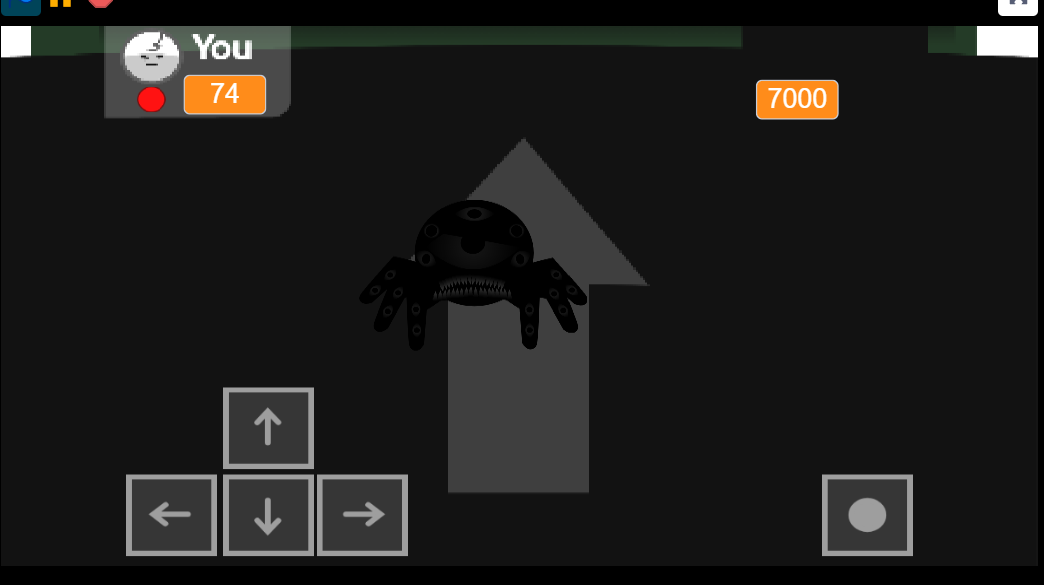
Fun Clicker Typical Extension Pack Part 2 shifts the clicker format into a boss-survival challenge. Instead of passive tapping, you move around an arena, dodge hazards, and time a single action input to survive each encounter.
The core loop is direct: reposition with WASD or Arrow Keys, watch for the on-screen action indicator, and press Space or E only when it turns green. Early inputs waste openings; late reactions end the fight.
Bosses include Levi, Flobby, Silence, and Cole, each with distinct attack patterns. Silence fires a massive laser that requires pre-positioning. Levi deploys shields and wormholes that displace your character mid-fight. Cole and Flobby use sweping attacks that punish edge positioning.
The soundtrack pulls from Geometry Dash custom levels—Bloodbath, Thinking Space 2, Nullscapes—and Deltarune themes, syncing high-tempo tracks to the escalating projectile phases.
How to Play Fun Clicker Typical Extension Pack: Part 2
Core Controls
- Move: WASD or Arrow Keys
- Action/Attack: Spacebar or E when the indicator turns green
- Mobile: Touch controls at the bottom of the screen
PC controls offer better precision during fast phases. Stay near the center of the arena to maximize evasion space and recovery time after forced repositioning.
Read the Boss, Then React
Do not spam attacks. Watch the boss pattern, prioritize movement, and wait for the green timing window.
- Silence: Pre-position before the laser fires, then move out of the line. Reacting at the last second rarely works.
- Levi: Track shield deployments and wormholes. Wormholes teleport you unpredictably, so move immediately after displacement and return to center.
Common mistake: Pressing Space or E before the green signal.
Fix: Hold movement until the indicator flashes green, then input once.
Early Strategy
Focus on learning movement responsiveness and the visual cue timing. Your first opponent tests whether you can separate dodging from attacking—panicking and spamming the action key leaves you vulnerable.
Mid/Late Strategy
Boss mechanics layer. Cole’s red-wheel attacks sweep the arena. Flobby’s patterns are eratic. Both punish edge positioning and reward tight, centered movement. If Levi forces you into a wormhole, reorient immediately rather than drifting.
Some players find the movement axes disorienting. Use the opening seconds of each fight to calibrate before heavy projectiles spawn.
Features of Fun Clicker Typical Extension Pack Part 2
- Boss-specific encounters: Levi, Flobby, Silence, and Cole use different attack styles rather than incremental difficulty.
- Timed action system: Attacks only register during the green indicator window.
- Movement-focused gameplay: Constant repositioning with WASD or Arrow Keys is required during projectile phases.
- Mobile support: Touch buttons allow mobile play, though keyboard input offers better reaction speed in later fights.
- Rhythm-driven presentation: Music from Geometry Dash custom levels and Deltarune themes syncs to boss attack patterns.
- Fun Clicker Typical Extension — Play the original extension to learn the series’ core click-and-survival structure before tackling Part 2’s faster boss patterns and tighter action timing.
- Fun Clicker but Its Only the 9th Stage — This stage-focused challenge is a fitting next test for players who enjoyed Part 2’s punishing late-game projectile dodges and reaction-heavy boss pressure.
- Fun Clicker Fanmade Extension — Its fan-built take on the formula offers more unusual encounters for players looking for additional reflex-driven Fun Clicker battles.
Enjoy!

 New
New


Discuss Fun Clicker Typical Extension Pack Part 2